
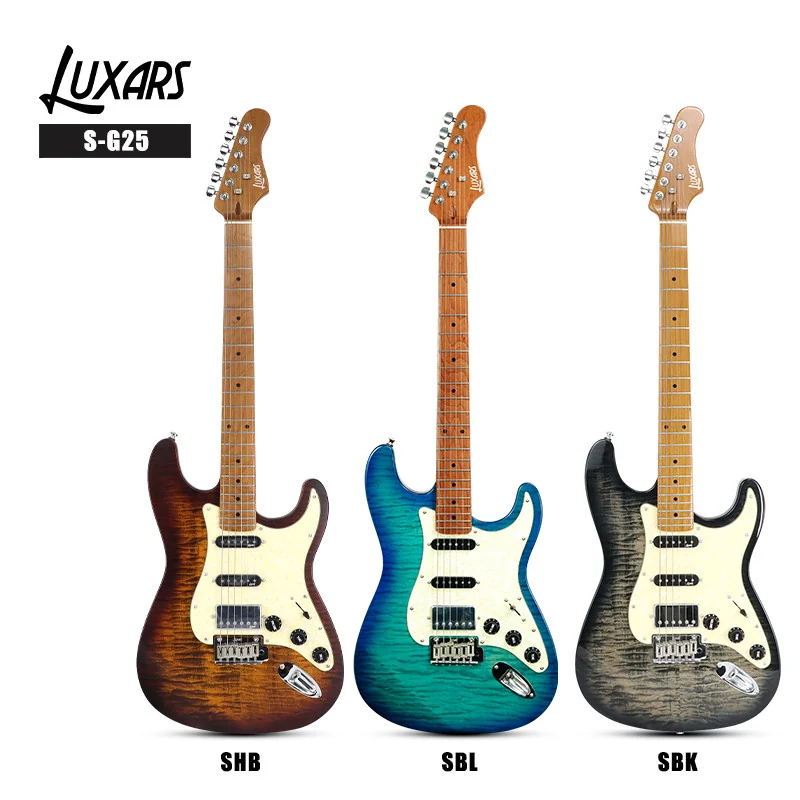
Keep a guitar’s colour code, surface sheen, finish chemistry and wood appearance in separate listing fields. Link those fields to the exact model and photographed variant. This gives retailers and online sellers a clearer way to describe an instrument, compare options and prevent a colour choice from silently changing the promised material or finish.
Use four fields instead of one “finish” label
A supplier code identifies a variant within a particular product record. A colour name helps a customer recognise its appearance. Gloss, satin and matte describe surface appearance, while a finish-system description identifies something different about the coating. Wood figure is another feature to document. Combining them into a single short label makes errors hard to spot.
Fender’s explanation of guitar finishes describes both satin and gloss urethane examples. Sheen alone therefore does not name a coating chemistry. Use the exact model specification for that field instead of diagnosing it from a photograph.
| Field | Record | Keep separate |
|---|---|---|
| Supplier colour code | The exact code and its model / revision. | Do not assume the same code means the same option across brands. |
| Customer colour name | Approved wording for the target language. | Do not invent an expansion of an abbreviation. |
| Surface sheen | Gloss, satin or matte where confirmed; identify the component. | A neck and body can require separate entries. |
| Material / coating | Approved construction and finish-system description. | Visible grain and reflections do not establish hidden construction or chemistry. |
Match codes to the actual model
The approved LUXARS S-G25 record and its product photograph identify SHB, SBL and SBK examples. Keep those codes attached to S-G25 and the matching photographs. A buyer-facing selector can use an approved colour description beside the supplier code, but the code itself should remain traceable.
Do not translate a supplier code or guess what each letter stands for. If two records use different names for what appears to be the same variant, request a mapping before merging the options. A similar photograph is useful evidence to compare; it is not sufficient proof that two revisions are identical.
Carry the selected code through the image set, listing, quotation and order record. A compact record can link model, supplier code, photograph reference and specification revision. If a photo is a general range reference, label it that way. The image selected for an individual option should make the customer’s choice clear without requiring them to interpret an unrelated group photograph.
Describe the neck and body independently
A statement about the body finish does not automatically describe the back of the neck, fingerboard or hardware. Add the component to the specification field: for example, “body surface sheen” and “neck surface sheen”. Populate each only when the model source supports it. This prevents a broad label from becoming an unintended claim about every surface.
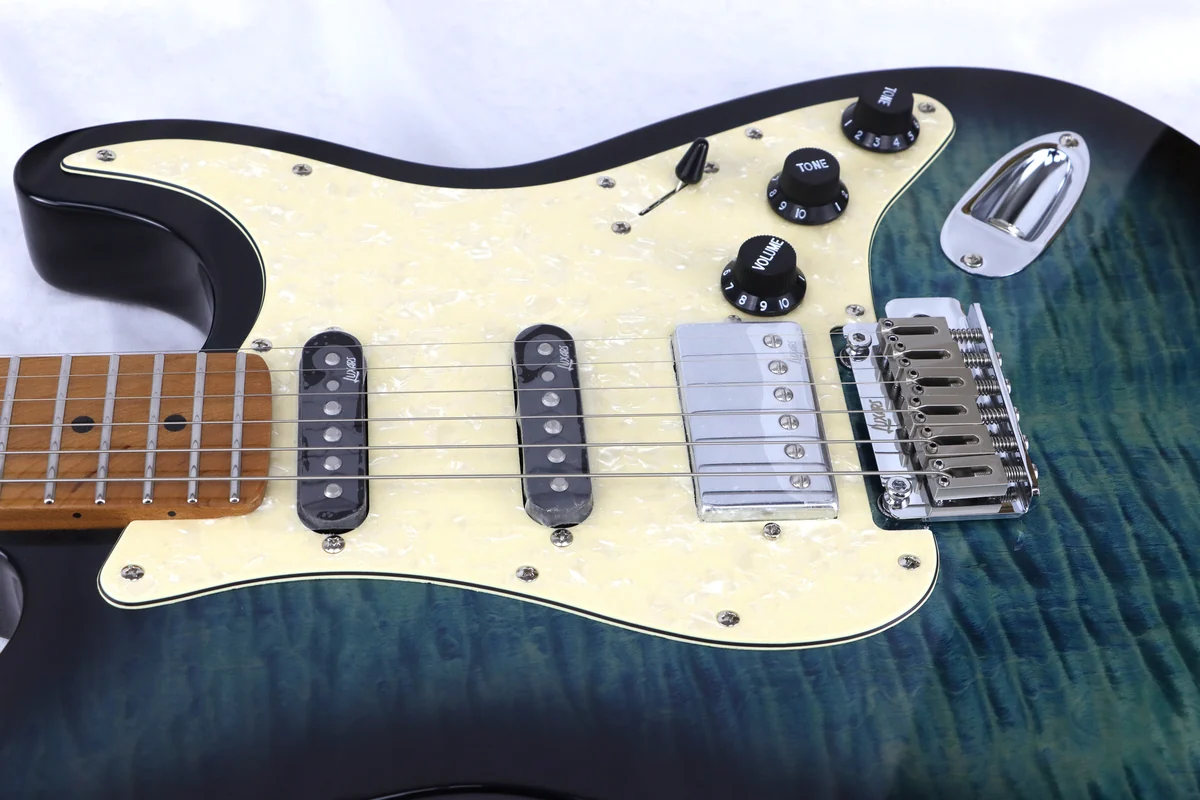
Keep material and decoration precise. The S-G25 record specifies flamed maple veneer. Visible figure in a photograph should not be rewritten as a solid flamed maple top. Grain appearance, veneer construction and surface finish belong in related but distinct entries.
Photograph appearance with a consistent method
Use comparable lighting, background and camera settings when showing several colour options. Include a full front view and an appropriate detail, keeping the product’s proportions intact. Strong reflections can hide a surface; very different exposure or white balance can make colour comparisons confusing. Record the sample and variant used for the image set.
A display image remains a representation viewed through a screen. Avoid promising an exact screen-to-product colour match. Where natural wood appearance varies, explain that only when it applies to the actual construction, and identify whether a photograph shows an example or the particular instrument being sold.
Image processing should help the buyer see the product clearly. Keep a usable original and record any crop or correction. A more dramatic colour is not a reason to replace the product’s actual appearance. Follow the product image and listing-data guide when assembling the rest of the listing.
Review the option as a complete record
Before publication, check the selected variant from the customer’s point of view. The option label, main image, model, specification and enquiry reference should agree. Change the option and repeat the check. This catches cases where a selector changes the name but leaves an image or descriptive paragraph from another variant.
Keep one approved mapping between supplier codes and the descriptions used in each language. Preserve the code in translations, while adapting ordinary colour and finish terminology to the market. A localised listing must not acquire a new finish chemistry, wood species or surface treatment through translation.
Two common listing questions
Can I label a shiny photograph “gloss nitro”?
Use that description only when the exact component and finish system are confirmed. A reflection in a photograph cannot establish the coating chemistry.
Can a colour option share every specification with another option?
Only when the approved records support that relationship. Confirm the model revision and any material, hardware or finish differences before copying specifications across variants.
Request the missing variant information
Use the current electric guitar directory to identify the exact model, then send the colour code, required photographs and missing fields to sale@luxarsmusic.com. Ask for an approved mapping instead of filling gaps with a similar model’s description.
 English